
Here's what's new:
- Editor Improvements: Marquee selection and fullscreen mode
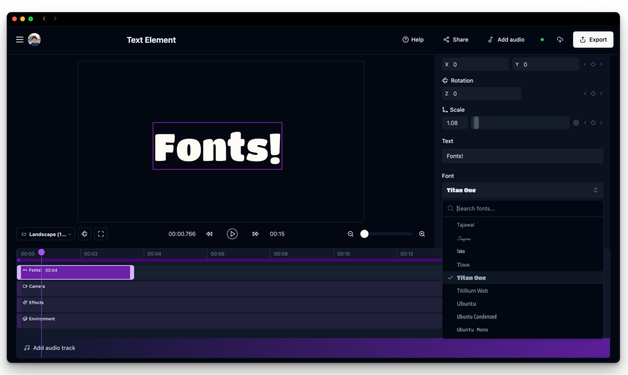
- New Text Element: Flat text with 250 fonts, while the old one is now 3D Text
- New Effects: Color Grading, Filter, and Fisheye
- Camera Controls: FOV setting and handheld shake overlay
- Box Textures: Apply custom images to 3D boxes
- Oscilloscope Revamp: Now displays your actual audio waveform
- Free Artwork Generator: Create album covers and single artwork with AI
- Free Plan: Try Banger.Show without signing up or paying
Editor Improvements
Marquee Selection
Click and drag in the timeline to draw a selection box around multiple clips. This makes it much faster to select, move, or delete groups of clips at once.
Fullscreen Mode
Click the fullscreen button in the preview to expand your video to full screen. Great for presentations or reviewing your work without distractions.
New Text Element
There's a new Text element for flat, 2D text with 250 Google Fonts to choose from. You have control over font weight (thin, regular, bold, etc.) and stroke width settings.
The previous Text element has been renamed to 3D Text and still works as before for extruded, three-dimensional text.
New Effects
Three new effects to enhance your visuals:
Color Grading
Add cinematic color adjustments to your scenes. Color Grading gives you control over:
- Brightness and Contrast for overall exposure
- Saturation to boost or mute colors
- Hue Shift to rotate the entire color palette
- Shadows, Midtones, and Highlights tinting
Filter
Apply instant color presets to your visuals. Filter works like Instagram filters but for video. Choose from presets like Vintage, Cold, Warm, and more to quickly set the mood.
Fisheye
Create a wide-angle lens distortion that bends the edges of your scene. Great for trippy visuals, action shots, or adding an immersive feel to your videos.
Find all three in the Effects clip in the timeline.
Camera Controls
Two new ways to control your camera:
FOV (Field of View)
Control the camera's field of view to create dramatic perspectives. A lower FOV gives a zoomed-in, compressed look. A higher FOV shows more of the scene with an expansive feel.
Handheld Shake
Handheld shake is now an overlay you can apply to any camera mode. Whether you're using Custom camera movement or Infinity Symbol mode, toggle on handheld shake to add subtle motion that makes your visuals feel more organic and dynamic.
Box Textures
The Box 3D object now supports custom textures. Upload your own images to wrap around the cube faces. Use it for album art displays, branded content, or creative geometric designs.
Oscilloscope Revamp
The Oscilloscope visualizer now displays your actual audio waveform instead of a generated pattern. The waveform stays perfectly in sync with your music, and you can adjust the sample count, vertical scale, and line width.
Free Music Artwork Generator
We've added a free AI-powered tool to create album covers, single artwork, and promotional images. Describe your vision, pick a style, and generate artwork in seconds. Try it out.
Free Plan
You can now try Banger.Show without creating an account. Just pick a template and start editing right away. When you're ready to export, you can sign up and choose a plan.
Free plan exports include a small watermark. Upgrade to remove it and unlock cloud rendering.
Bug Fixes and Improvements
- Smoother audio playback: Fixed choppy audio in the preview and improved render stability.
- Timeline clip overlap fix: Clips no longer overlap incorrectly when moving a selection to the left edge.
- Shader settings stability: Fixed UI jumping when loading images in shader settings.
- Template loading fix: Fixed incorrect loading state when navigating between pages.
- Feedback moved to Discord: Share feedback and feature requests in our Discord community instead of Canny.
