
Here's what's new in today's update:
- Long Videos: Create videos up to one hour long
- Timeline Improvements: Auto-scrolling when extending clips or scene duration
- Cloud Renders in Desktop App: Both cloud and local rendering now available in the desktop app
Long Videos (Up to One Hour)
This was the most requested feature on our feature request board, and we're thrilled to finally make it happen.
You can now render full DJ sets and mixes with visuals that react to your music for the entire duration. Whether you're creating a one-hour live set recording, an extended mix compilation, or any other long-form content, Banger.Show can now handle it.
Here are the new limits:
- Cloud renders: Up to 30 minutes
- Local renders: Up to one hour
We know many of you have been waiting for this. Creating visuals for a 10-minute track was great, but being able to render a complete DJ set or mixtape opens up entirely new possibilities for your releases and live recordings.
This feature is still a bit experimental, so please let us know if you encounter any issues. We're actively working on improving stability and performance for longer videos.
Sheesh, it only took two years. I appreciate everyone who voted for this.
Rendering videos up to one hour is finally here. You can now render up to 30 minutes in the cloud, or go all the way to one hour locally in the desktop app. Technically, this was not easy at all, but after extensive testing on my machines (Mac and Windows), it works.
That said, this feature really pushes hardware to its limits. On weaker machines, local renders may be very slow or may not complete at all, so keep that in mind when rendering from the app. We'll fix that. So we’re keeping a close eye on bug reports.
It’s finally shipped. What a breath of fresh air!
– Igor, co-founder
Timeline Improvements
Working with long timeline just got a lot smoother. We've added automatic scrolling when you're adjusting clip and scene durations.
Now when you drag an extend handle on a clip or extend a scene duration, the timeline will automatically scroll back and forth to follow your cursor. No more awkward stop-and-scroll moments when you're trying to stretch a clip beyond the visible area.
It's one of those small quality-of-life improvements that makes the editing experience feel more fluid and natural.
Cloud Renders in Desktop App
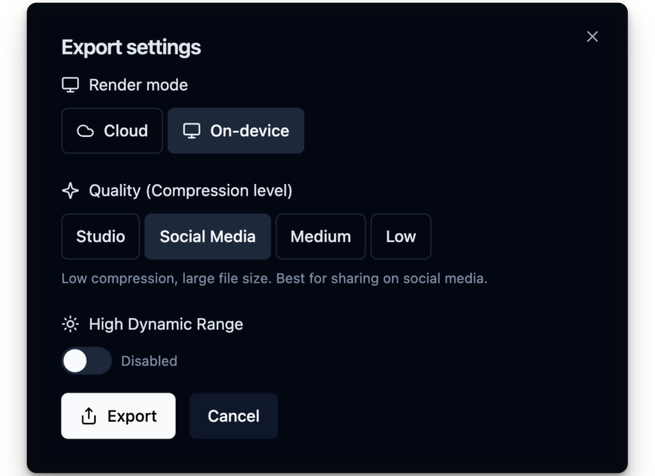
The desktop app now gives you the best of both worlds. Previously, you could only render locally on your machine. Now you can choose between cloud and local rendering directly from the desktop app.
Want to keep working on your next project while a render finishes? Send it to the cloud. Prefer to use your GPU and skip the upload? Render locally. The choice is yours, and you can switch between them depending on what works best for each project.
Bug fixes and improvements
- Faster project loading: opening projects now feels instant thanks to optimized audio data loading. For older projects, re-upload your audio to take advantage of this improvement.
